
Platform / For developers
For developers and platform teams Beta
Developers on the same rules and the same bill.
Give each service or team a gateway key with a monthly limit, a model list and a rate limit. Calls pass through your policies and land in the ledger your finance team already reads.
How it works
One key per service or team, with its own limits.
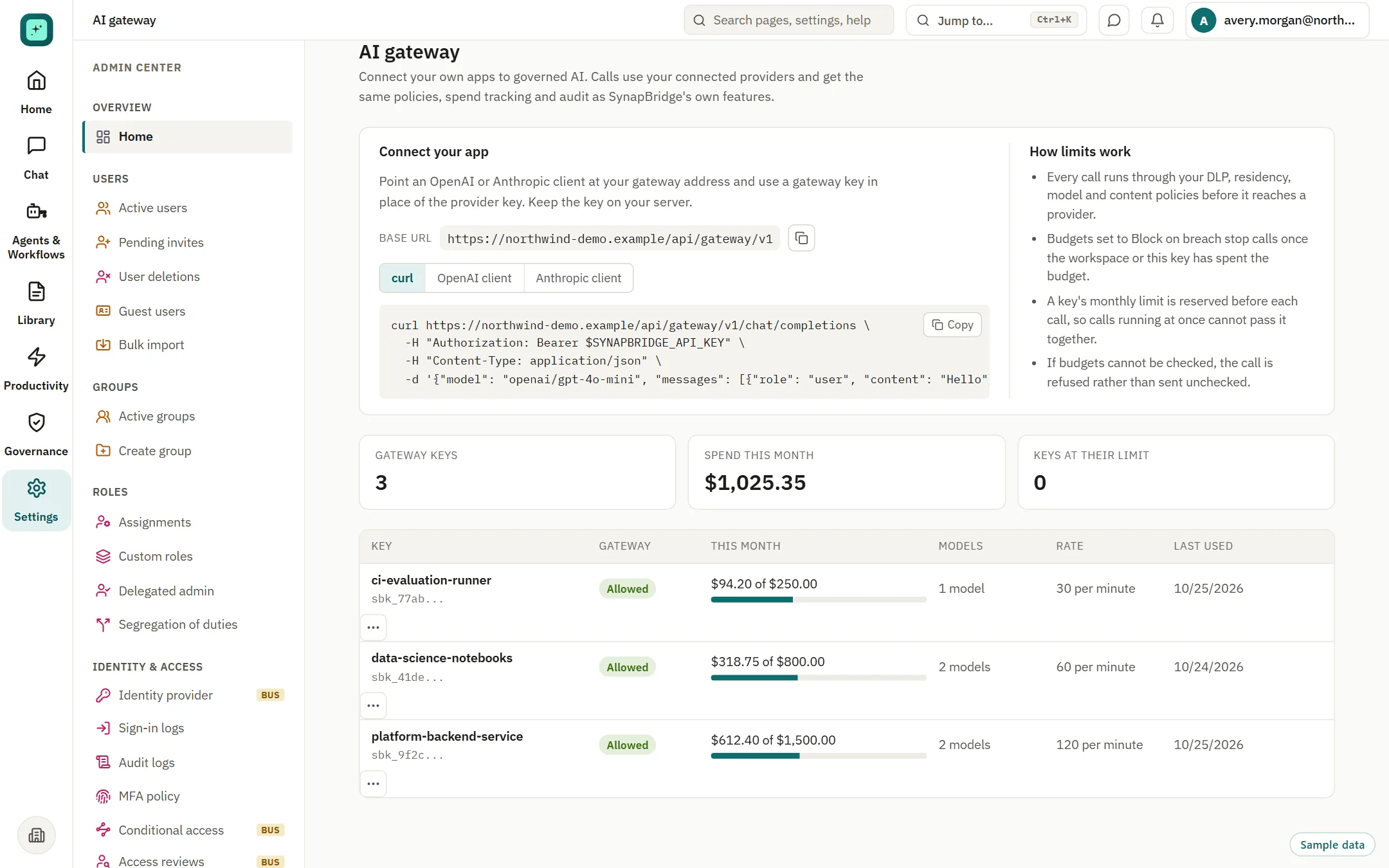
Admins create gateway keys. Developers point an OpenAI or Anthropic client at the gateway address and use the key in place of a provider key. The calls pass through your policies and land in the same ledger as everyone else's.
01
Create a key
Owners and admins create gateway keys. The secret is shown once, and a key can be rotated or revoked at any time.
02
Set its limits
Give each key a monthly cap in dollars, a list of allowed models and a requests-per-minute limit. Every change is written to the audit log.
03
Point the client
Use the gateway base URL with your existing OpenAI or Anthropic client, or a plain curl call. Keep the key on your server.
What happens on each call
The same checks as every other governed request.
Each call runs through your sensitive-data, residency, model and content policies before it reaches a provider. Spend is counted against the key and the workspace.
- A key's monthly limit is reserved before each call, so calls running at once cannot pass it together
- Budgets set to block on breach stop calls once the workspace or the key has spent the budget
- If budgets cannot be checked, the call is refused rather than sent unchecked
Around the gateway
The rest of the developer picture.
Spend by key and team
Month-to-date spend per key sits beside the ledger. Attribution to team and project works as it does for everyone else.
Agents and tool servers Beta
Approve tool servers before agents can use them, and keep a record of each run.
Usage from command-line tools Beta
Supported command-line and agent tools can send usage to your workspace with a telemetry token. A status check shows what arrived in the last seven days.
Questions
The gateway, answered directly.
Who can create a gateway key?
Owners and admins.
Which models can a key reach?
The models on the providers you connect, narrowed to the list you set for that key.
Is this a developer observability product?
No. It is a governance and spend layer for calls that go through SynapBridge. It is not built for tracing or evaluating model quality.
What about calls that bypass the gateway?
They are outside scope. Controls apply to calls made through SynapBridge.
Where is the secret stored?
The secret is shown once when the key is created. After that, only a prefix is shown, and you can rotate or revoke the key.
Give every service a key with a limit.
Book a walkthrough with your platform and finance leads.